Write UDF documents with Word comfort — pixel-matched with UYAP.
Lexudo Editor is a Windows document editor written from scratch that opens, edits, saves and e-signs UYAP UDF files directly, with no conversion layer. Word-quality writing experience, page layout matched to the UYAP editor. Your documents stay on your device.
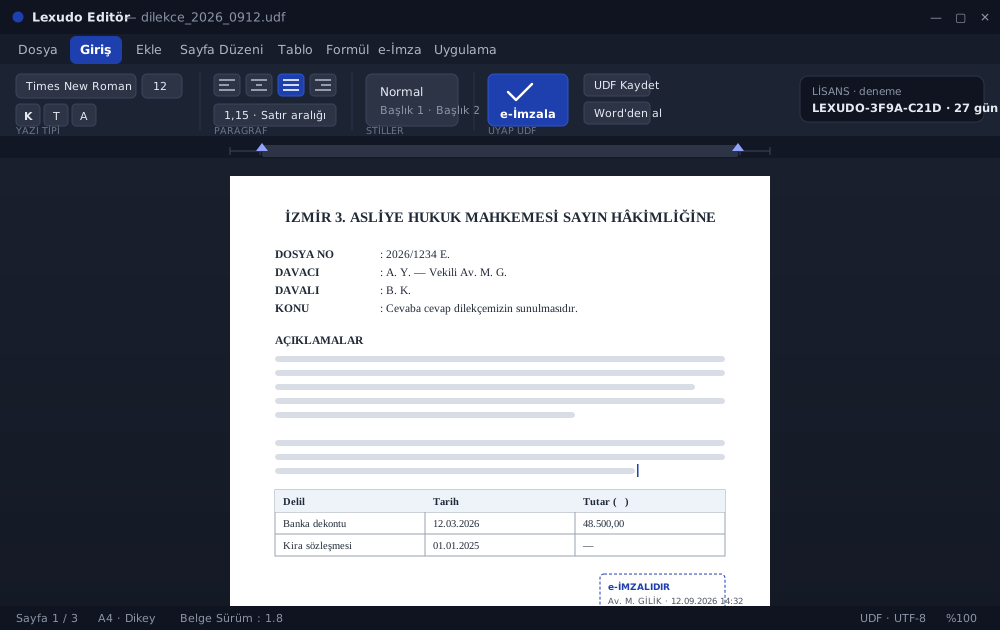
For everyone who produces documents for UYAP.
Lawyers
Write petitions, replies, statements and contracts directly as UDF, e-sign them, upload to UYAP.
Expert witnesses
Prepare reports with tables, formulas and proper page layout; they look the same in UYAP.
Law offices
Open several documents at once; migrate from Word; easy installation and update management.
Speaks UDF natively.
Lexudo Editor processes the UYAP UDF format directly without a conversion layer; what you write is what UYAP shows.
Open and save directly
Opens UYAP UDF files without conversion; when you save, the UYAP editor shows the same layout.
- Line-breaking and page-layout parity
- .udf files open with a double-click
Import from Word
Bring your .docx documents into UDF with their styles, numbering and page settings.
- Character and paragraph styles
- Bordered and borderless tables
Sign with a smart card
Sign the document with your e-signature certificate in the structure UYAP accepts.
- Same signature structure as UYAP
- Signature stamp view
Data safety
Automatic recovery drafts; even if the license cannot be verified, saving and printing stay available.
- Your text is never lost because of licensing
- Document content never leaves your device
Word quality, UYAP compatibility.
Word-quality editing
Glyph-level canvas rendering; ruler, indents, tab stops, line spacing — just as you know from Word.
Formula editor
WYSIWYG math: fractions, super/subscripts, matrices and symbols — for expert reports.
Tables
Bordered and borderless tables; tables pasted from Word keep their structure.
Clipboard compatibility
Formatted copy-paste (HTML/RTF) with Word and other apps — both directions.
Multiple documents
Several UDF files open at once; single app instance, fast switching.
Update notifications
The app tells you when a new version is out; download and install with your approval.
Your documents stay on your device.
Document content is never sent out; only license verification and installation/version info reach our systems.
Local processing
Opening, editing, saving and signing happen entirely on your device; no cloud.
Machine-bound license
1 key = 1 computer. When you change devices, the license is moved from the admin panel.
Saves even when locked
If the license cannot be verified only editing locks; saving and printing stay free.
Transparent telemetry
Only installation and version info (machine-id hash, computer/user name, version, launch count). Never a document name or content.
Questions you may have.
Do my documents go to the cloud?
No. Opening, editing, saving and e-signing happen entirely on your device; document content or names are never sent to any server. Only license verification (machine-id hash) and installation/version info are transmitted.
How do I get the trial?
Register with the form below; once you create your account and complete your profile, your download link appears in your account. You sign in with your account during setup and your licence is recognised automatically — you never type a key. The 30-day trial starts at first installation and binds to that computer.
What system is required?
Windows 10/11 (64-bit) and the Microsoft Edge WebView2 component (built into Windows 11; the installer checks). The setup is ~7 MB, installs machine-wide and asks for administrator approval. No NVIDIA GPU needed.
Will my document open in UYAP?
Yes. Lexudo Editor produces the UYAP UDF format directly without conversion; line breaking and page layout target pixel parity with the UYAP editor. Acceptance by official systems is subject to that institution’s own rules.
Is an internet connection required?
For license verification, yes: the app checks its license regularly (about every 5 minutes). During a temporary outage it keeps working for up to 1 day after the last successful check. Document content is never sent.
What happens if the license cannot be verified?
The app does not close. Only editing locks; you can still save, print and export the open document. You never lose your text because of licensing.
Is installation safe? It says “unknown publisher”.
The trial is not yet signed with an Authenticode certificate; Windows SmartScreen may warn: More info → Run anyway. The setup comes from the official GilTec distribution source.
Is Lexudo Editor an official UYAP application?
No. Lexudo Editor is independent, third-party software with no official connection to the Turkish Ministry of Justice (UYAP). “UYAP”, “UDF” and similar names only describe file-format compatibility and belong to their owners.
Try free for 30 days.
Register; once you create your account and complete your profile, your Lexudo Editor key and download link appear in your account automatically.
Lexudo Editor is independent, third-party software with no connection, partnership or endorsement with the Turkish Ministry of Justice (UYAP) or other official institutions. “UYAP”, “UDF”, “e-Adalet” and other names/brands are used only to describe compatibility and belong to their respective owners.