OCR judicial documents on your device — no cloud.
LexAI reads UYAP UDF, PDF and scanned documents without them ever leaving your computer, using the power of your graphics card. It extracts clean text, preserves the layout and tables of the page, and shows the result side by side with the original.
Timings were measured on an eight-core laptop with an RTX 4070 mobile graphics card; they vary with your own card. The accuracy figure is measured per character on digital documents with an intact text layer.
For high-volume, confidential document work.
Expert witnesses
Turn hundreds of case-file pages (UDF + PDF/image attachments) into reportable text locally.
Lawyers & legal professionals
Examine UYAP UDF, bank statements, expert reports and policies in the interface and extract with structure.
Judicial & corporate units
Process records offline when data-security rules prevent cloud transmission.
The right method for each page — automatically.
LexAI detects whether a page is digital or scanned and picks the right flow.
Clean digital page
Extracts embedded text directly with positioning — OCR-free (PDF/UDF/Office).
- Preserves the page layout and tables
- Damaged font / shifted-cmap detection → OCR if needed
Scanned / damaged page
Graphics-card accelerated recognition; orientation correction, no line loss on dense pages.
- Automatic orientation (90/180/270) fix
- High resolution + adaptive recognition
Digital + embedded image
Keeps digital text, OCRs embedded photos/seals/signatures; merges both with positioning.
- Digital area locked (no overlap)
- Embedded-image inspection area
UDF, docx/xlsx, images
UDF main text + attachments; Office documents; individual images — in a single flow.
- UDF = main text (digital) + attachments (PDF/image)
- Type filtering & grouping
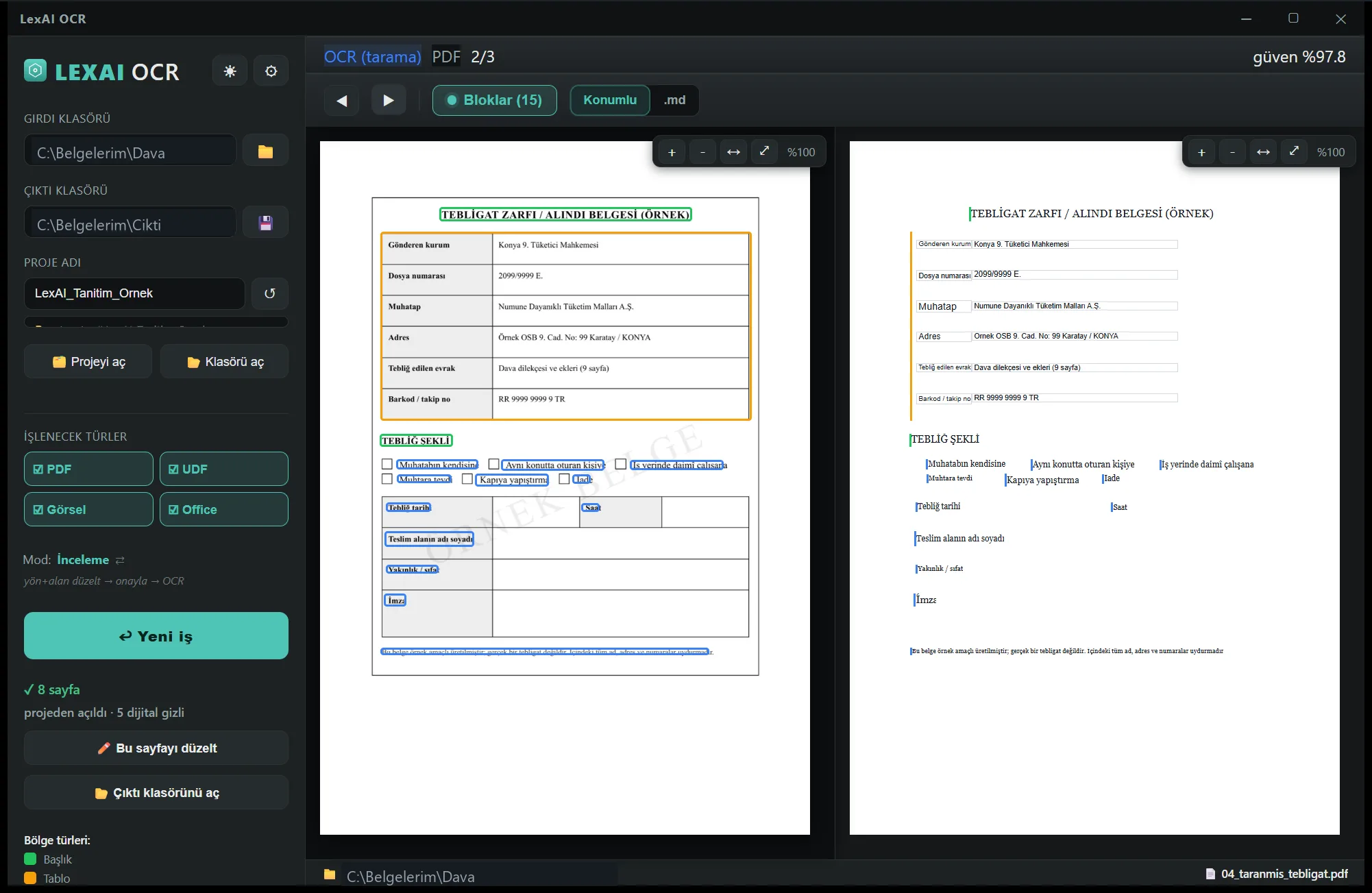
Side-by-side review
Original with detection boxes on the left, positioned render on the right. Compare exactly; navigate with ←/→ and the mouse.
- Positioned render — close to original, font-aligned
- Possible data-loss warning (ink coverage)
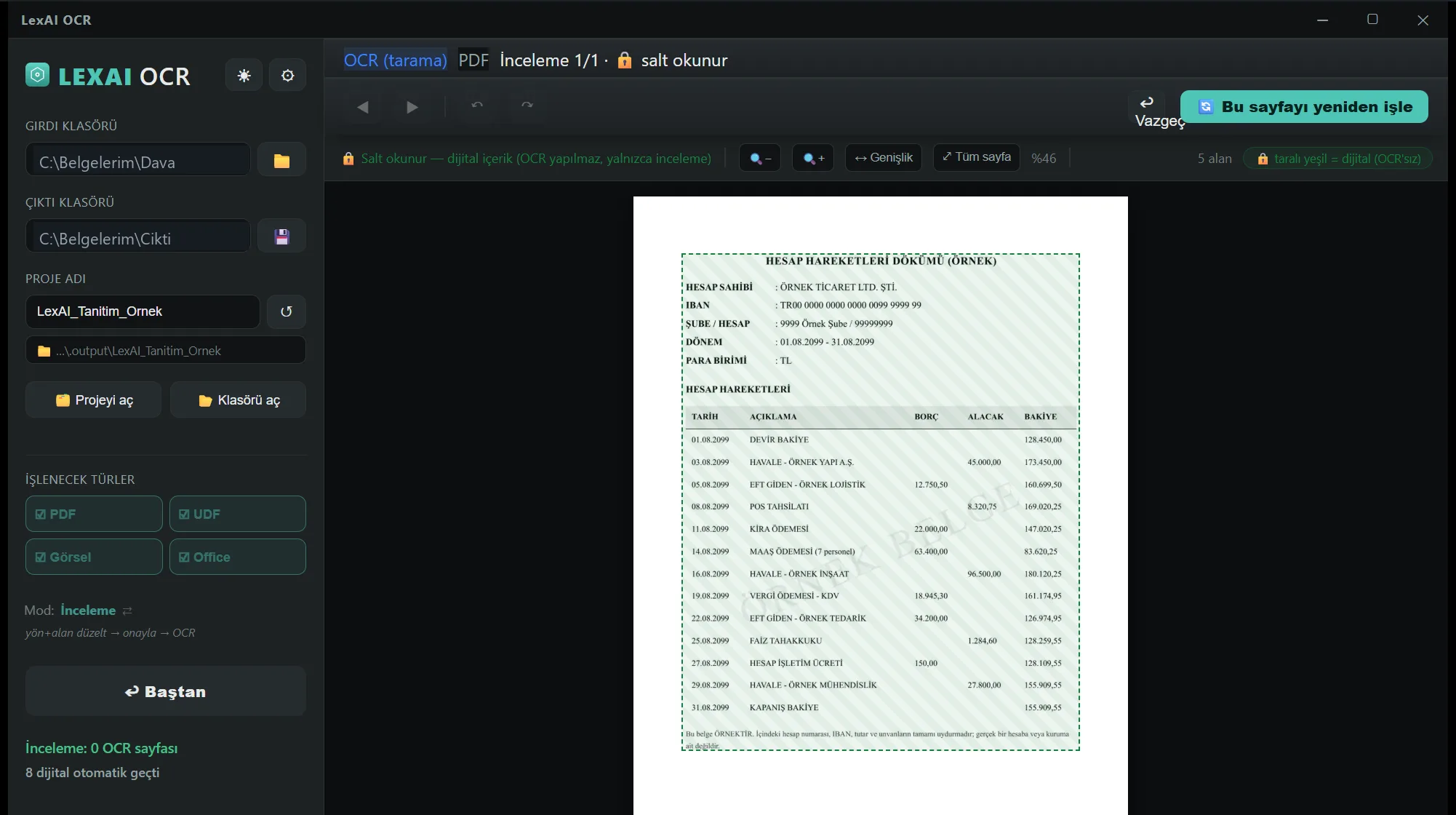
See and correct the areas
The program finds the areas on the page first; you correct or approve them; recognition runs afterwards. Add areas, change their type, undo.
- Orientation (90/180 + free angle) + area correction
- Polygon / text / table / figure / seal palette
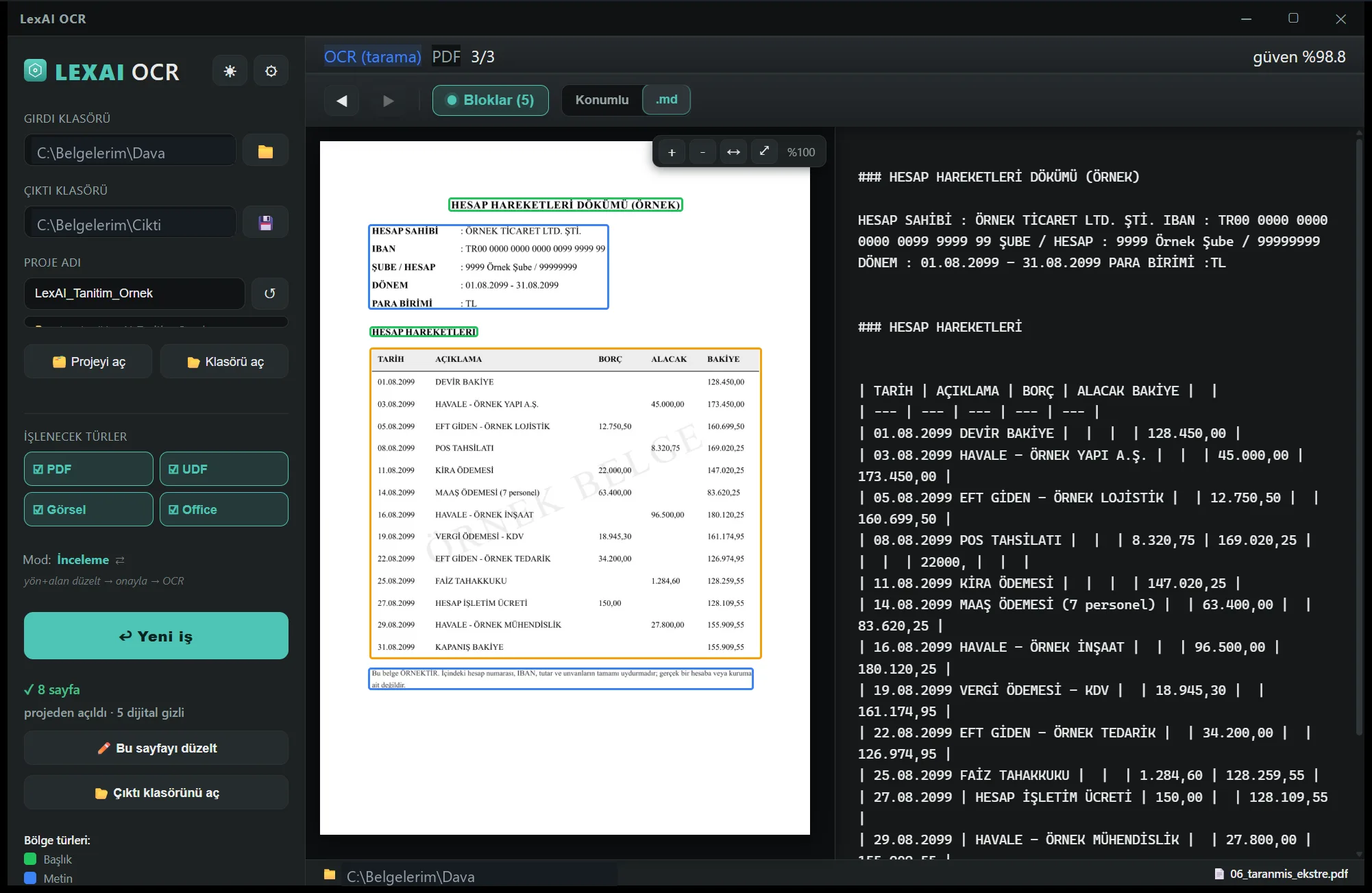
Output you can use
The result comes out as usable text: copy it, search it, paste it into your report. Tables keep their row structure.
- Text, tables and headings are marked separately
- Without borders the row grid is inferred — review is advised
Local, fast, self-managing.
Privacy first
Documents never leave the device; processing is fully local. Built for evidence.
Graphics-card acceleration
Recognition runs on your graphics card; digital pages with an intact text layer skip recognition entirely.
Table structure
Extracts bordered + borderless tables with positioned cells.
UYAP UDF + many formats
UDF, PDF, image, Office — single flow, type filtering/grouping.
Auto-update
Sees new versions on startup/tray; notifies, validates, installs.
Tray agent
Waits in the background tray; releases the engine on close (VRAM freed).
Evidence stays on your device.
Document content is never sent out; only anonymous license and update checks are performed.
Local processing
OCR and review entirely on-device; no cloud.
Raw OCR preserved
No automatic corrections that corrupt output — evidence integrity.
Licensed & machine-bound
Copy-protected; online license validation.
Signature-validated updates
The downloaded setup is verified with SHA-256.
Why OCR locally?
Privacy is non-negotiable for evidence. LexAI sends no documents to the cloud — plus speed and predictable cost.
LexAI — Local Recommended
- ✓Documents stay on device — zero cloud, legal/GDPR safety
- ✓Works offline — only license/update checks online
- ✓No upload, queue or download delay — processing happens on your computer
- ✓Opens UYAP UDF files directly + tells digital and scanned pages apart on its own
- ✓30-day free trial — you sign in with your account during setup
Cloud services
- ✕Documents uploaded to a server — privacy/GDPR risk
- ✕Internet required — no offline operation
- ✕Upload + queue + download latency
- ✕UYAP UDF mostly unsupported
- ✕Per-document pricing is common
Questions on your mind.
Do my documents go to the cloud?
No. All processing is local on your device; document content never leaves. Only anonymous technical info (machine-ID hash, version) is sent for license validation and update checks.
How do I get the trial?
Fill in the short form and complete your account; your download link appears in your account. You sign in with your account during setup and your licence is recognised automatically — you never type a key. The 30-day trial starts at first installation and binds to that computer.
What hardware is required?
Windows 10/11 (64-bit) and a current-driver NVIDIA graphics card with at least 4 GB of memory. The program spends a few seconds preparing on first launch. The full installer is 2.8 GB; the setup program downloads only the parts your computer is missing.
Can it open UYAP UDF files?
Yes. It processes UDF main text and attachments (PDF/image); it automatically decides digital vs. scan per page.
Is installation safe? It says “unknown publisher”.
The beta is not yet signed with an Authenticode certificate; Windows SmartScreen may warn: More info → Run anyway. The setup comes from the official LexAI distribution source.
Is LexAI an official UYAP application?
No. LexAI is independent, third-party software with no official connection to the Turkish Ministry of Justice (UYAP). “UYAP”, “UDF” and other names belong to their respective owners.
LexAI Setup
Download the small setup program; you sign in with your account during setup, your license is recognised automatically and only the parts your computer needs are downloaded. You never type an activation key.
- Download and run it.
- Sign in with your account (e-mail code or Google).
- Setup completes on its own; LexAI opens already activated.
If you see an “unverified publisher” warning, choose More info → Run anyway.
- Work on long documents is no longer lost. If the program or the computer shuts down while a document of hundreds of pages is being processed, the finished pages are kept and the job resumes where it left off.
- Protection against closing by accident. If you try to close the program while a job is running, it now asks first.
- Graphics card warning on battery fixed. Unplugging the device used to report “graphics card not found”; it now says the card is present but unavailable for power saving. Plugging back in clears the warning by itself.
- Updating is quieter now. Unnecessary questions during setup are gone, and the duplicate LexAI entry that could appear in the Windows app list is fixed.
If your connection is limited or you work on a closed network, you can download the single-file installer.
Offline installer (2,9 GB) →Try 30 days free.
Register; once you create your account and complete your profile, your license and download link appear in your account automatically.
LexAI is independent, third-party software with no connection, partnership or endorsement with the Turkish Ministry of Justice (UYAP) or other official institutions. “UYAP”, “UDF”, “e-Adalet” and other names/brands are used only to describe compatibility and belong to their respective owners.